
Assets
one registry that ties your safety work to the equipment
How to register equipment, track recurring checks, read the asset record that pulls together scans, inspections and lockouts, and never miss a due date.
Short answer
ShieldSphere's Assets module is the registry of every machine, vehicle and piece of equipment at a site, paired with a check tracker that gives each asset a cadence and flags it Overdue the moment a check is missed. Hazard scans, checklist inspections and ZeroState periodic inspections performed against an asset count as checks automatically, so existing work keeps the record current.
1What Assets does
Assets is the registry that turns "we have a fire extinguisher somewhere" into "this fire extinguisher, checked monthly, last verified on the 7th, with every scan and inspection against it on one screen".
It does two jobs at once:
- A registry of every machine, vehicle and piece of equipment at the site.
- A check tracker that gives each asset a cadence - weekly, monthly - and flags it Overdue the moment a check is missed.
Its quiet power is that it connects the other modules. A hazard scan, a checklist inspection, or a ZeroState periodic inspection performed against an asset counts as a check automatically - so the work your team already does keeps the asset current without anyone logging it twice.
Assets is a site-level module. The assets you register here are the same ones you can link a scan to in the AI Hazard Scanner, scope a checklist inspection to in Inspect, and attach a lockout procedure to in ZeroState.
2Words you'll see
| Term | What it means |
|---|---|
| Asset | One machine, vehicle or piece of equipment in the registry. |
| Check cadence | How often the asset needs a check - every week, every month - or no cadence at all. |
| Check | A recorded verification of the asset. Logged by hand, by QR scan, or automatically by a scan or inspection. |
| Overdue | The badge an asset gets when its next check date has passed. |
| QR check tag | A printable code fixed to the asset; scanning it logs a check from a phone, no login needed. |
| Status | Whether the asset is Active or retired. |
3The asset registry
Click Assets in the sidebar. The registry lists every asset at the site, with the one number that matters called out at the top: how many are overdue for a check.
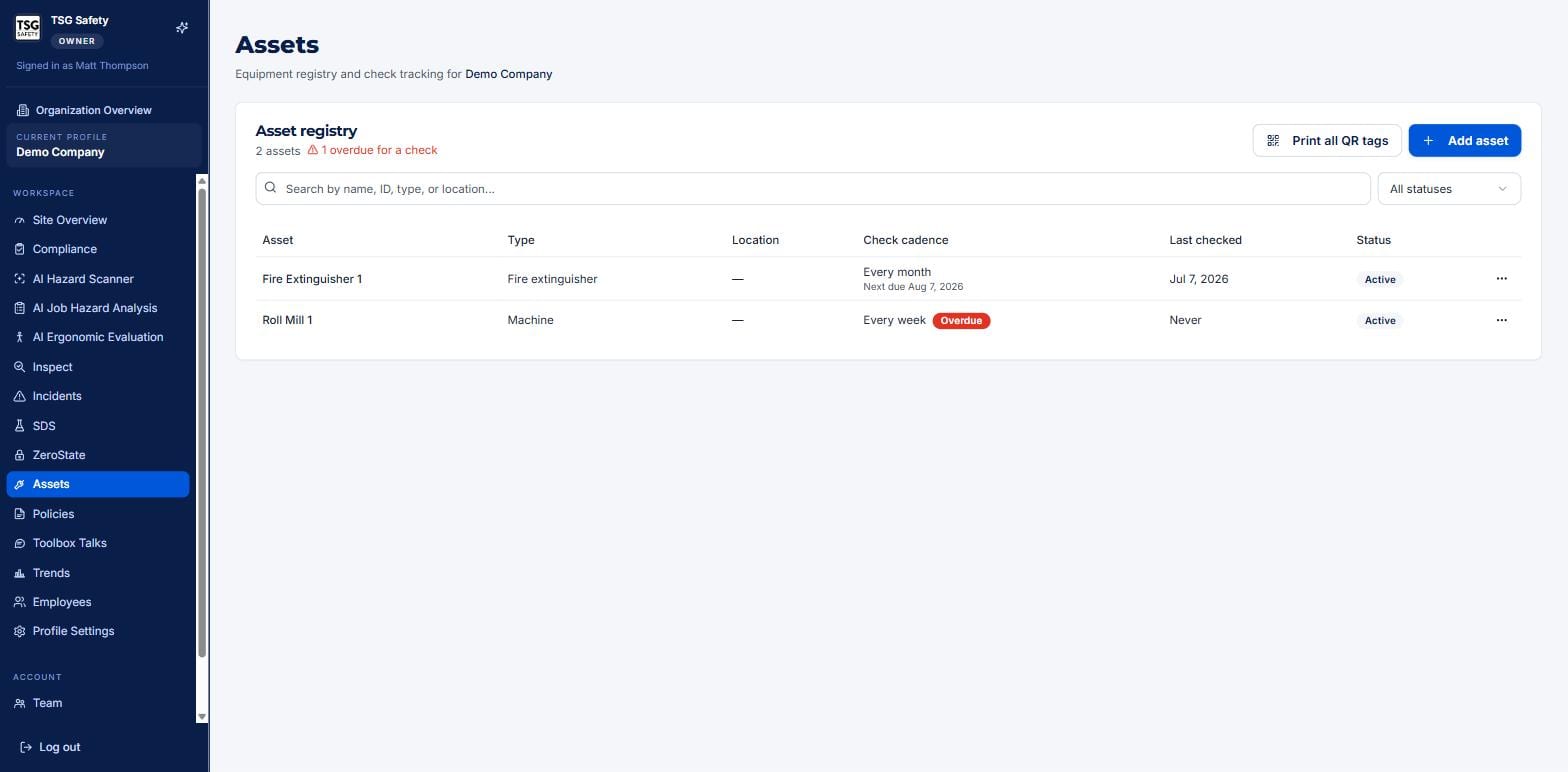
Search by name, ID, type or location, or filter by status. Two buttons sit top-right: Print all QR tags to produce scannable labels for every asset at once, and Add asset to register a new one.
4Register an asset
A minute per machine now saves the "when did we last check that?" scramble later.
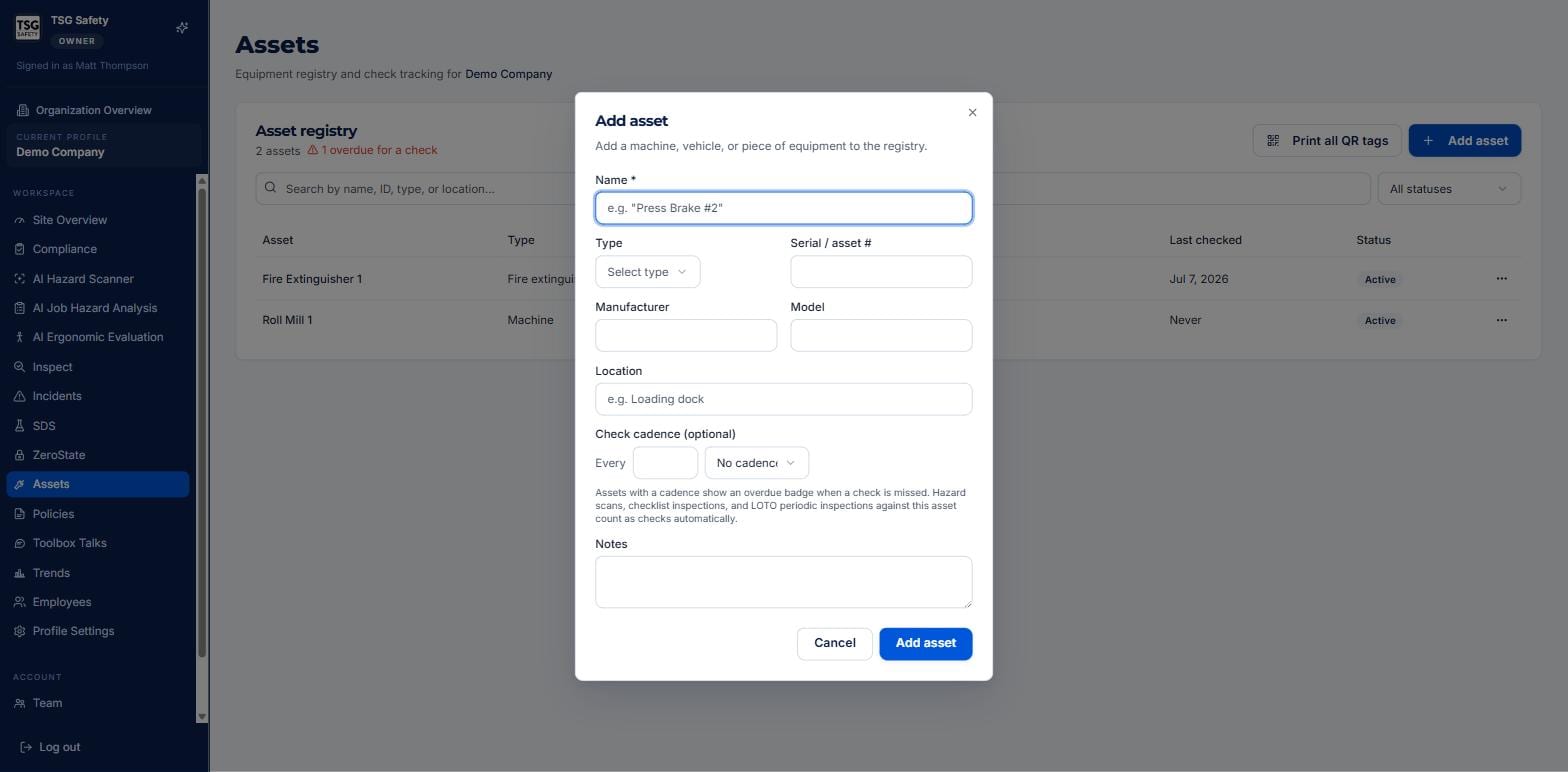
Fill in what you know - name, type, serial or asset number, manufacturer, model, location - and set a check cadence if the asset needs recurring checks. The dialog says it plainly: assets with a cadence show an overdue badge when a check is missed, and hazard scans, checklist inspections and LOTO periodic inspections against the asset count as checks automatically.
Fire extinguishers, eyewash stations, machine guards - anything OSHA expects you to check on a schedule. Without a cadence the asset is just a record; with one, ShieldSphere does the remembering.
5Inside an asset
Click any asset to open its record - the single place everything about that piece of equipment comes together.
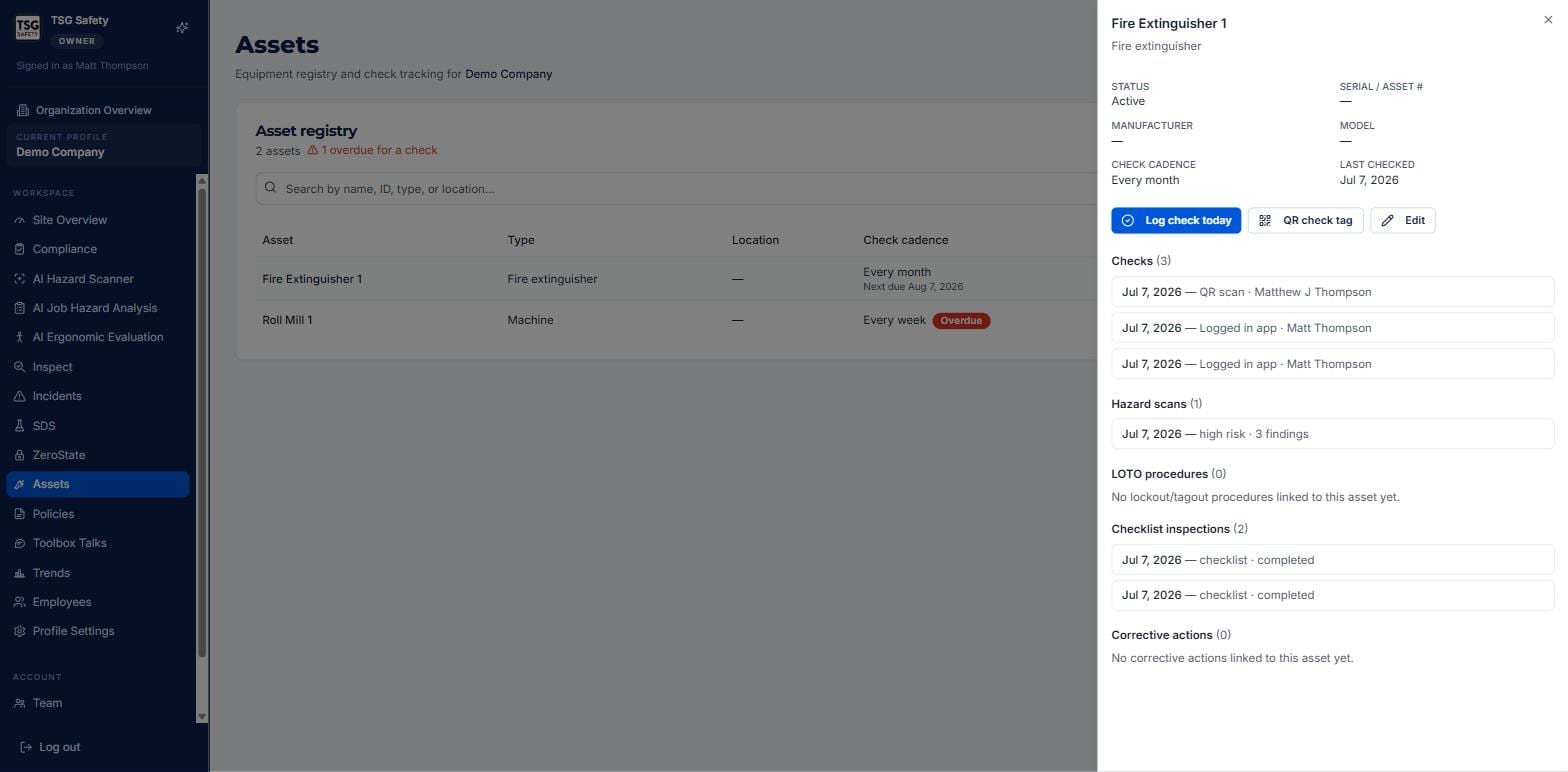
The three buttons at the top are the actions you take most:
| Control | What it does |
|---|---|
| Log check today | Records a check right now, resetting the cadence clock. |
| QR check tag | Shows the asset's printable QR code - fix it to the equipment so anyone can log a check by scanning. |
| Edit | Update the asset's details, cadence or status. |
Below the buttons, each section is a live tie to another module: the hazard scans run on this asset, the LOTO procedures that lock it out, the checklist inspections scoped to it, and any corrective actions raised against it. It is the closest thing to a single maintenance-and-safety history for the machine.
6Checks and QR tags
There are three ways a check gets logged, and you will use all three:
By hand
Log check today on the asset record - for a quick visual verification.
By QR scan
Someone scans the asset's QR check tag with a phone and logs the check on the spot, no login.
Automatically
A hazard scan, checklist inspection or LOTO periodic inspection against the asset counts as a check on its own.
Print one tag from an asset's QR check tag button, or the whole set from Print all QR tags on the registry. Fix them to the equipment and the shop floor becomes self-documenting - a walk-by scan is a logged check.
7Troubleshooting
| Symptom | Cause and fix |
|---|---|
| An asset shows Overdue | Its next check date has passed. Log a check - or run the scan or inspection that counts as one - to clear it. |
| An asset never goes overdue | It has no check cadence. Edit the asset and set one if it needs recurring checks. |
| A scan or inspection did not count as a check | It was not linked to the asset. Pick the asset in the Location / Equipment field when you run it. |
| The asset does not appear in another module's dropdown | Check you are on the same site - assets are site-level, and each module lists only that site's assets. |
| I need labels for the floor | Use QR check tag on one asset, or Print all QR tags for the whole registry. |
Try Assets in ShieldSphere
Start a free hazard scan and see the platform these guides describe - no credit card required.
Screens captured from the live application in July 2026 using a demonstration site - your screens will show your own data. Because ShieldSphere ships changes regularly, check the version above against the current release before circulating this guide widely. Questions? Contact support.