
Employees
the roster that connects people to the work
How to build and maintain a site's employee roster - the list every other module draws on to assign work, record training, and tie an incident to a person.
Short answer
ShieldSphere's Employees module is a site's roster - the single list of workers the rest of the platform reaches into whenever it needs a name. Keeping it current is what lets you assign a corrective action to a person, record whose respirator fit test is due, name the injured worker on an OSHA 301, and pull an employee's whole safety history in one click.
1What the Employees module does
Employees is the site's roster - the single list of people that the rest of ShieldSphere reaches into whenever it needs a name.
It is quiet infrastructure with a large reach. The roster you keep here is what lets you assign a corrective action to a person, record whose respirator fit test is due, name the injured worker on an OSHA 301, and pull an employee's whole safety history in one click. Keep it current and every other module gets easier; let it drift and assignments start pointing at people who left.
The Employees roster is the workers at a site - the people safety work is about. It is different from Team, which is the ShieldSphere user accounts that can log in and manage the program. A forklift operator is an employee; a safety manager with a login is a team member.
2The roster
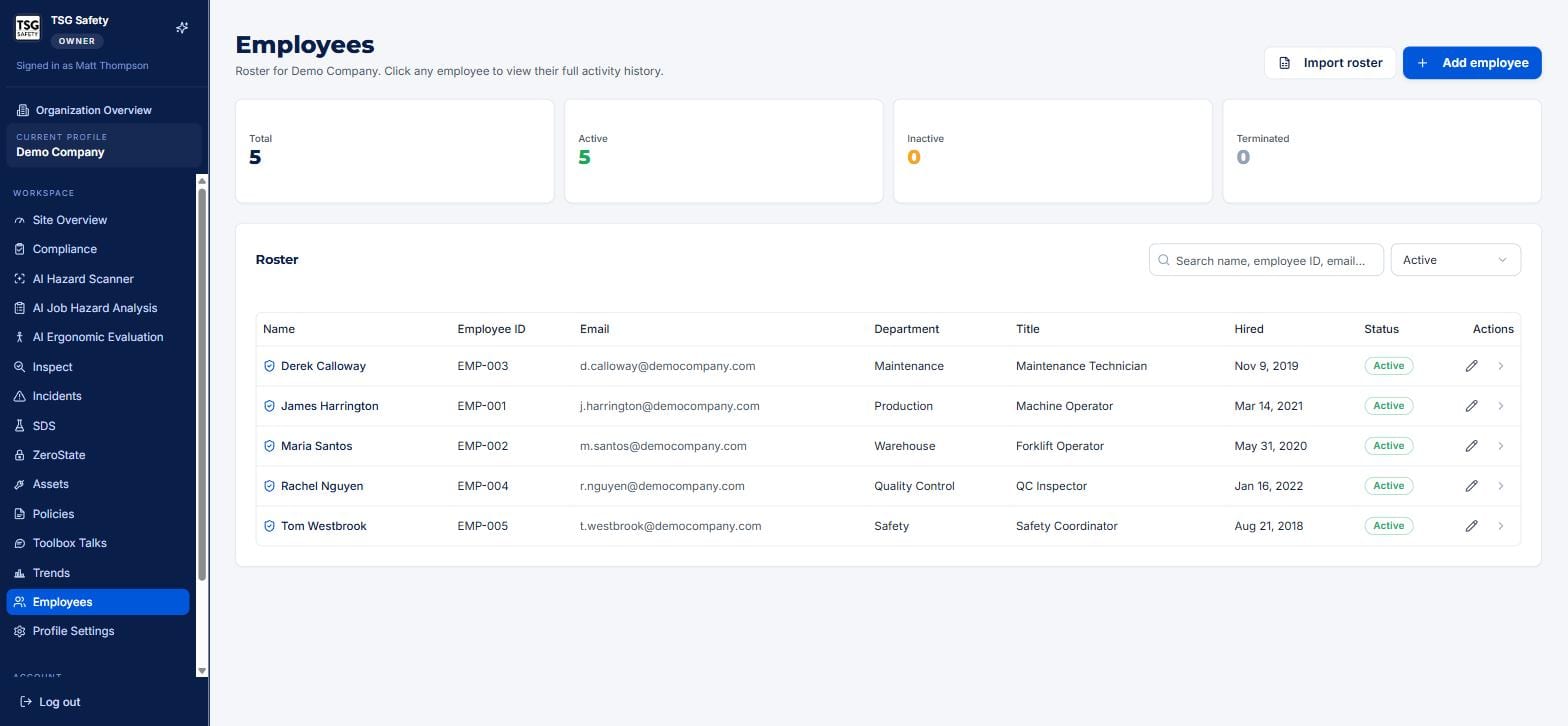
Click Employees in the sidebar. The roster lists everyone at the current site, with four status tiles across the top - total, active, inactive, terminated.
3Add and import employees
| Action | When to use it |
|---|---|
| Add employee | One person at a time - enter their name, employee ID, email, department, title and hire date. |
| Import roster | A whole team at once - bring an existing employee list in rather than typing each row. The fast way to stand up a new site. |
Most payroll and HRIS exports write names as Doe, John, while everything that matches a person later - training sign-in above all - expects John Doe. The import wizard detects the convention across the whole file and asks whether to convert, showing you what it will do first, because an inverted roster is hard to spot and annoying to undo.
It decides per file rather than per row, so a roster never comes out half one way and half the other, and it never guesses where a surname begins: van der Berg, Jan becomes Jan van der Berg, and a suffix stays with the surname. Rows it cannot read unambiguously are left exactly as they are and shown to you.
An employee's email is how ShieldSphere sends them a corrective-action completion link or a training reminder without them needing an account. Capture it now and the field-facing workflows in other modules just work.
4An employee's activity history
Click any row to open that employee's record and see their full activity history - the training on file, the incidents they were involved in, the corrective actions assigned to them, and more, gathered from across the modules.
This is the view to open before a performance conversation, a return-to-work discussion, or an audit question about a specific worker - everything ShieldSphere knows about that person's safety record, in one place.
5Statuses and good housekeeping
Each employee carries a status - Active, Inactive, or Terminated - shown in the tiles at the top and filterable in the roster.
- Keep leavers accurate. Mark someone terminated rather than deleting them - it keeps their historical records intact for audits while removing them from the pool of people you can assign new work to.
- Fix departments and titles when people move. Reporting and assignment lean on these fields; a stale title sends the right task to the wrong context.
6Troubleshooting
| Symptom | Cause and fix |
|---|---|
| An employee is missing from a dropdown in another module | They are not on this site's roster, or are marked inactive/terminated. Add them, or set them active. |
| Reminders and links are not reaching someone | Their email is missing or wrong on the roster. Edit the record and add a valid address. |
| A former employee still gets assigned work | Mark them Terminated - do not delete them, so their history survives. |
| I have a long list to enter | Use Import roster instead of adding one at a time. |
| The roster looks wrong | Confirm the current profile in the sidebar - the roster is per site. |
Try Employees in ShieldSphere
Start a free hazard scan and see the platform these guides describe - no credit card required.
Screens captured from the live application in July 2026 using a demonstration site - your screens will show your own data. Because ShieldSphere ships changes regularly, check the version above against the current release before circulating this guide widely. Questions? Contact support.