
AI Job Hazard Analysis
a task, broken into steps, hazards and controls
How to turn a short task clip or a written description into a formal JHA - ordered steps, the hazards at each one, and the controls worked through the hierarchy of controls.
Short answer
ShieldSphere's AI Job Hazard Analysis breaks a task into the steps a worker actually performs, names the hazard at each step, and prescribes the control that removes it. Give it a short video of the job or a written description, and it returns ordered steps, risk-rated hazards, controls labelled by the hierarchy of controls, and the required PPE - drafted in minutes rather than an afternoon.
1What Job Hazard Analysis does
A Job Hazard Analysis breaks a task into the steps a worker actually performs, names the hazard at each step, and prescribes the control that removes it - the document safety professionals build by hand in an afternoon, drafted here in minutes.
You give it a task two ways - a short video clip of the job being done, or a written description - and it returns:
- Ordered steps - the task as a sequence, in the order it happens.
- Hazards at each step - each with a risk level and a plain-language explanation.
- Controls - the fix for each hazard, labelled by where it sits in the hierarchy of controls.
- Required PPE - pulled together from the controls, including gear needed only for specific steps.
Not all fixes are equal. The strongest is to eliminate the hazard, then substitute something safer, then engineering controls (guards, interlocks), then administrative controls (procedures, training), and only last, PPE. The JHA tags every control with its level so you can see whether you are truly fixing the hazard or just asking people to wear gloves around it.
If a task came out of the AI Hazard Scanner, use Create JHA from this scan there - it lands here with the description already filled in from the scan's findings. See the AI Hazard Scanner User Guide.
2Words you'll see
| Term | What it means |
|---|---|
| Task | The job being analysed - "Operating a roll mill", "Replacing a press-brake die". |
| Step | One stage of the task, in the order the worker performs it. |
| Hazard | A way the step could hurt someone, with a risk level (Critical / High / Medium / Low). |
| Control | The measure that removes or reduces the hazard, tagged by its level in the hierarchy. |
| Hierarchy of controls | Elimination → Substitution → Engineering → Administrative → PPE, strongest first. |
| Required PPE | The personal protective equipment the controls call for, gathered into one checklist. |
| Draft / Final | A JHA you are still editing, versus one you have reviewed and marked final. |
| Employee handout | A worker-facing version of the JHA, optionally with the controls included. |
3Generate a JHA
Two routes in - a clip or a description - and the same formal analysis out.
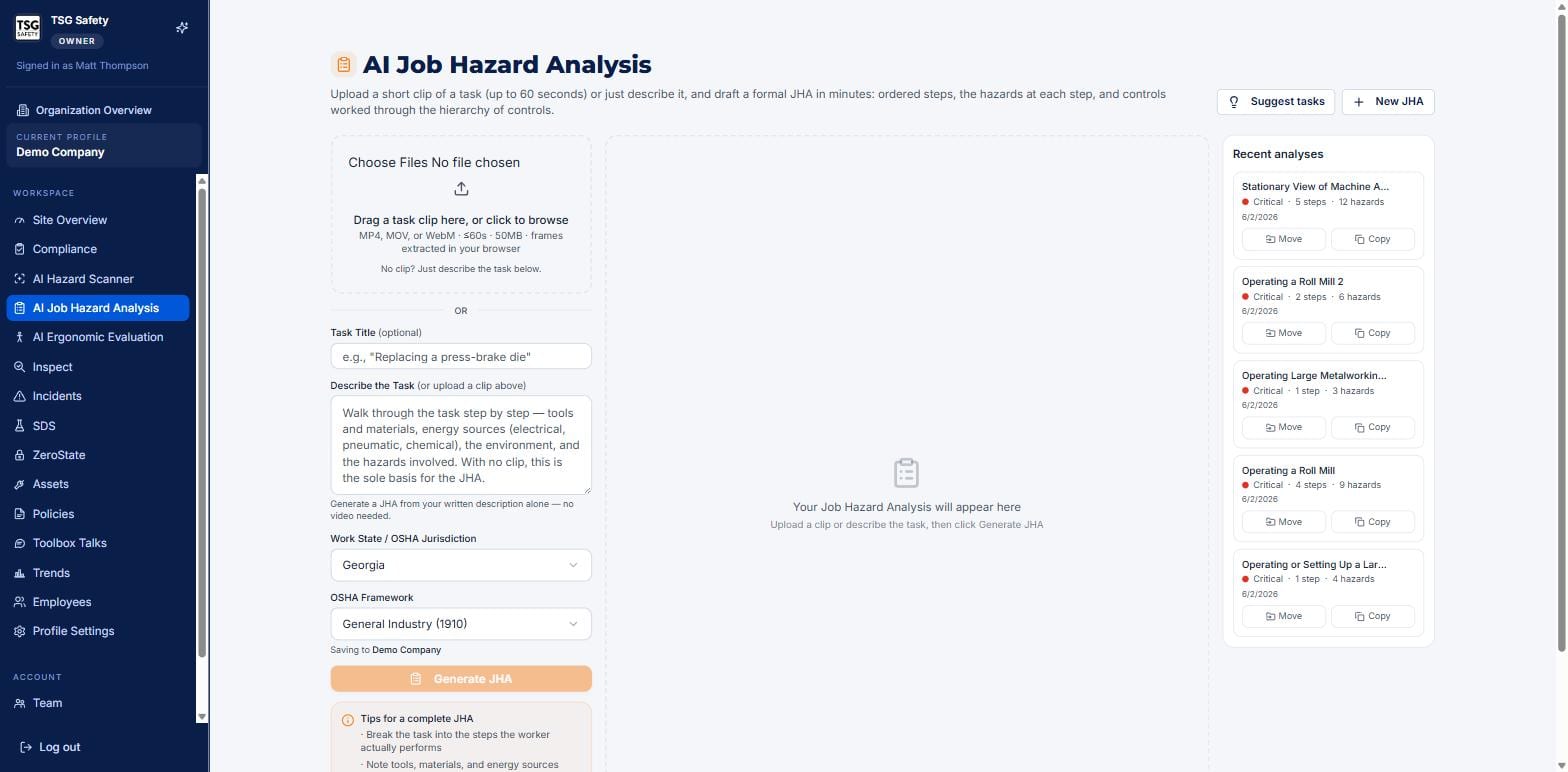
Give it the task
Either drag a task clip onto the upload box - MP4, MOV or WebM, up to sixty seconds and 50 MB, with frames pulled in your browser - or skip the clip and describe the task in the text box. A written description on its own is enough to generate a full JHA; a clip just adds the detail a camera catches that words miss.
Set the jurisdiction
Choose the Work State and OSHA Framework - General Industry (1910), Construction (1926), and so on - so the controls are written against the rules that apply. The JHA saves to the site named under the framework.
Break the task into the steps the worker actually performs. Note tools, materials and energy sources - electrical, pneumatic, chemical. Mention anything off-camera the clip will not show. For a clip, hold it steady and keep it under sixty seconds while the task is performed.
Click Generate JHA
In a few seconds the analysis appears in the center and saves as a Draft in Recent analyses. From here you review it - the AI drafts, you decide what is right for your floor.
4Read the analysis
Top to bottom: how bad, what to wear, and then the task itself - step by step, hazard by hazard, control by control.
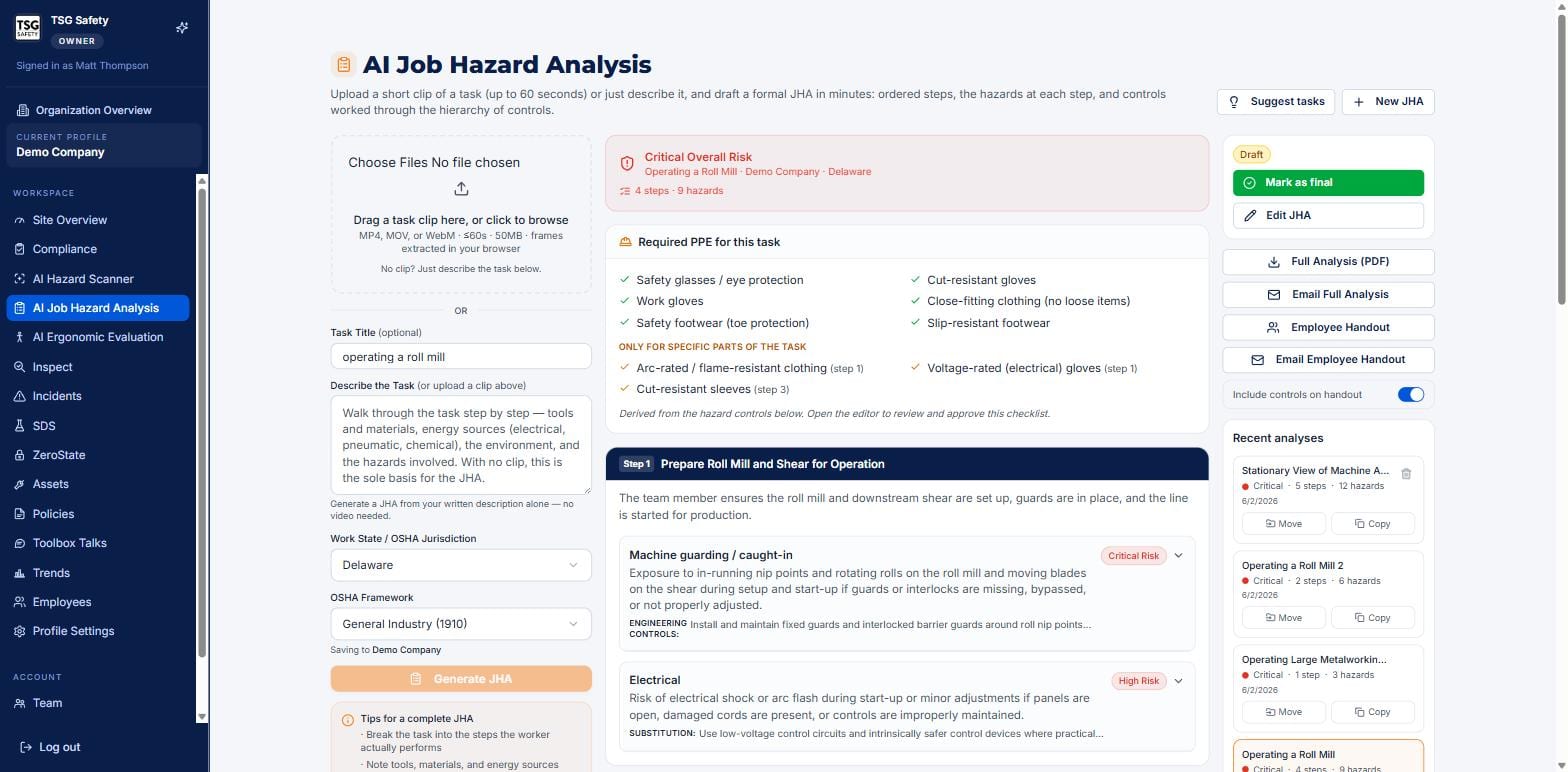
Each step is a titled band, followed by its hazards. Every hazard carries a risk badge, a description of how it could hurt someone, and one or more controls - each tagged with its level in the hierarchy, so you can read at a glance whether the fix eliminates the hazard or merely manages it.
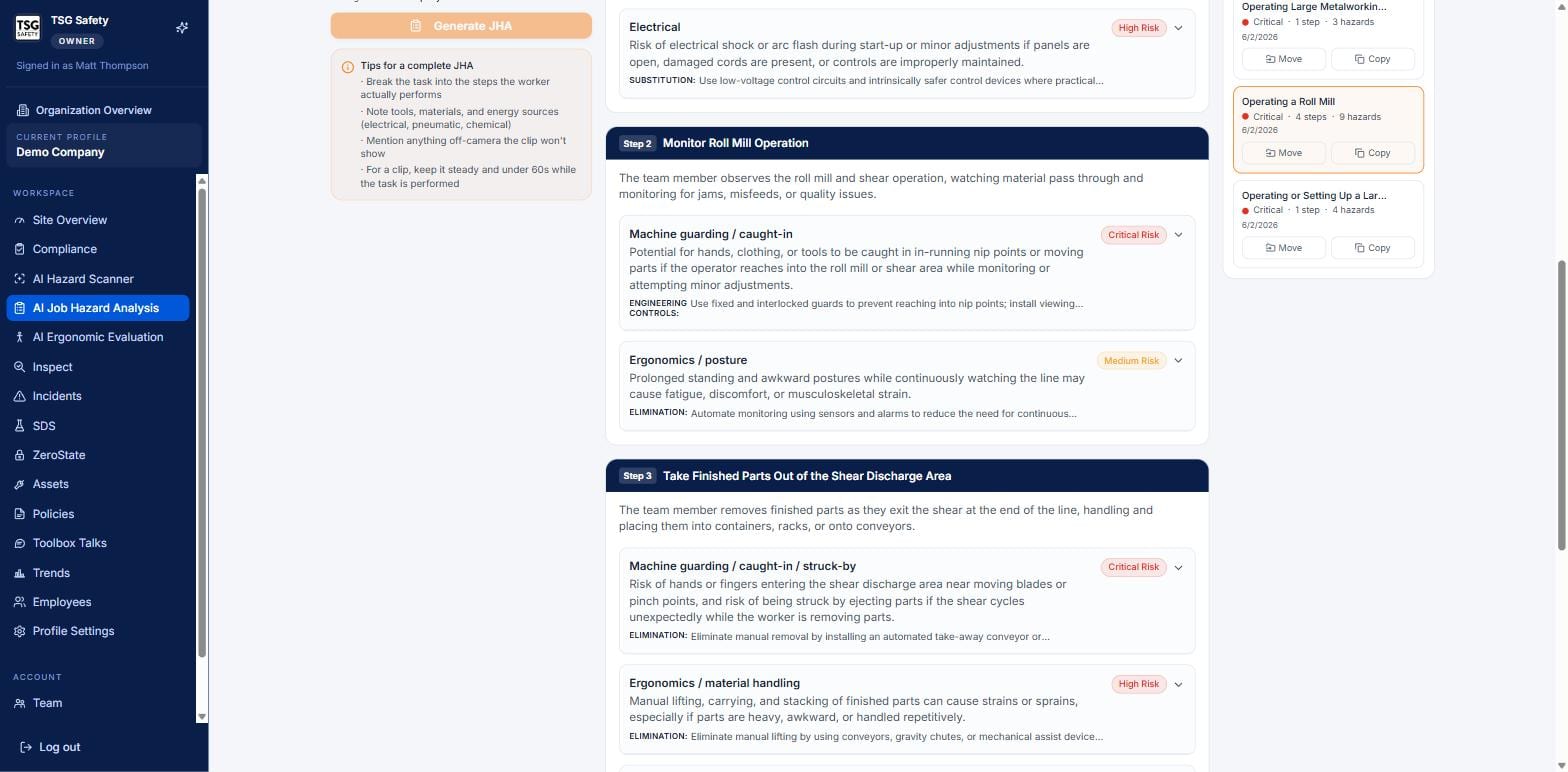
ELIMINATION, SUBSTITUTION, ENGINEERING CONTROLS - are the whole point: they push the fix up the hierarchy, away from "wear PPE and be careful".5Finalize and share
The panel on the right of any analysis is where a draft becomes a working document:
| Control | What it does |
|---|---|
| Edit JHA | Adjust steps, hazards and controls before you commit - the AI's draft is a starting point, not the last word. |
| Mark as final | Locks the analysis as your reviewed, approved version. The badge flips from Draft to final. |
| Full Analysis (PDF) | The complete JHA - steps, hazards, controls and PPE - as a document for the file or the client. |
| Email Full Analysis | Sends that full version straight from the app. |
| Employee Handout | A worker-facing version for the crew doing the job. The Include controls on handout toggle decides whether they see the controls too. |
| Email Employee Handout | Sends the handout to the people who need it. |
A JHA is a document people will work to. Read every step against how the job is really done on your floor, edit anything the AI over- or under-called, and only then mark it final.
6Suggested tasks for your industry
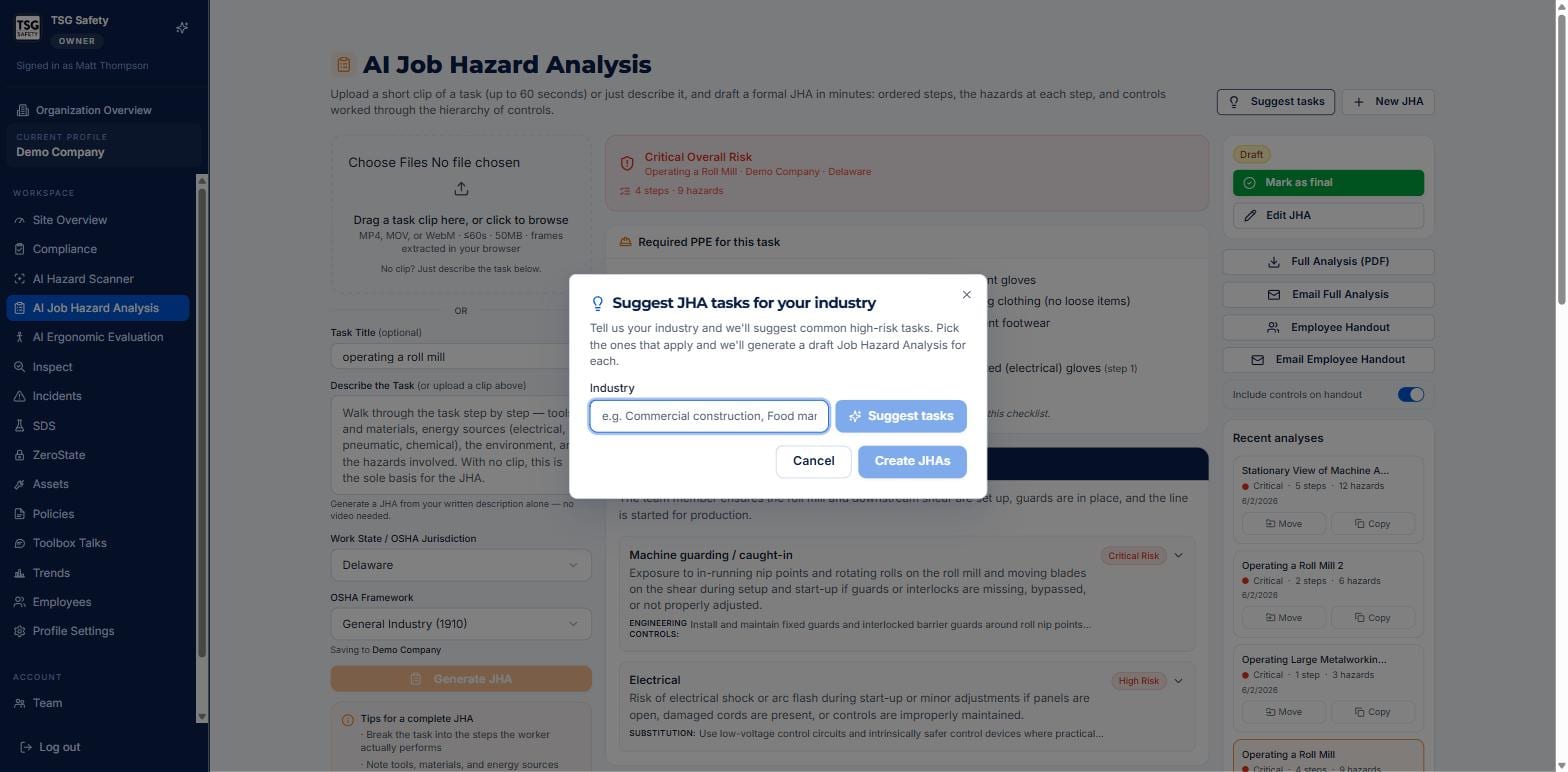
Not sure which tasks to analyse first? Click Suggest tasks at the top right, tell it your industry, and it proposes the common high-risk jobs for that kind of work. Pick the ones that apply and it drafts a JHA for each in one go.
7Troubleshooting
| Symptom | Cause and fix |
|---|---|
| Generate JHA does nothing | There is no clip and no description. Add one - a written description alone is enough. |
| My clip will not upload | It is over sixty seconds or 50 MB, or an unsupported format. Use MP4, MOV or WebM, shorter and steadier. |
| The steps do not match how we do the job | Use Edit JHA to reorder, add or remove steps before marking it final. The draft is a starting point. |
| The controls are all PPE | That usually means the description was thin. Add detail about the equipment and energy sources so the AI can propose engineering and elimination controls. |
| Workers should not see the controls | Turn off Include controls on handout before sending the employee handout. |
| I want it saved to a different site | Check the site named under the OSHA Framework, or use Move on the analysis in Recent analyses. |
Try AI Job Hazard Analysis in ShieldSphere
Start a free hazard scan and see the platform these guides describe - no credit card required.
Screens captured from the live application in July 2026 using a demonstration site - your screens will show your own data. Because ShieldSphere ships changes regularly, check the version above against the current release before circulating this guide widely. Questions? Contact support.