
Profile Settings
the site details every module builds on
How to configure a site's identity, address, contact, OSHA classification, portal visibility and PPE inventory - the settings that shape policies, reports and hazard programs.
Short answer
ShieldSphere's Profile Settings page holds a site's identity, and the fields are not cosmetic. The industry you choose drives which policies and hazard programs get recommended, the operating states you set decide which citations appear, and the company name and logo print on every exported report, policy, toolbox talk and hazard scan.
1What Profile Settings does
Profile Settings is the identity of a site - the company details, jurisdiction and inventory that the rest of ShieldSphere reads to make everything else specific to you.
These are not cosmetic fields. Your industry drives which policies and hazard programs get recommended; your operating states decide which citations appear; your company name and logo print on every exported report, policy, toolbox talk and hazard scan. Get this page right once and every deliverable downstream comes out correct.
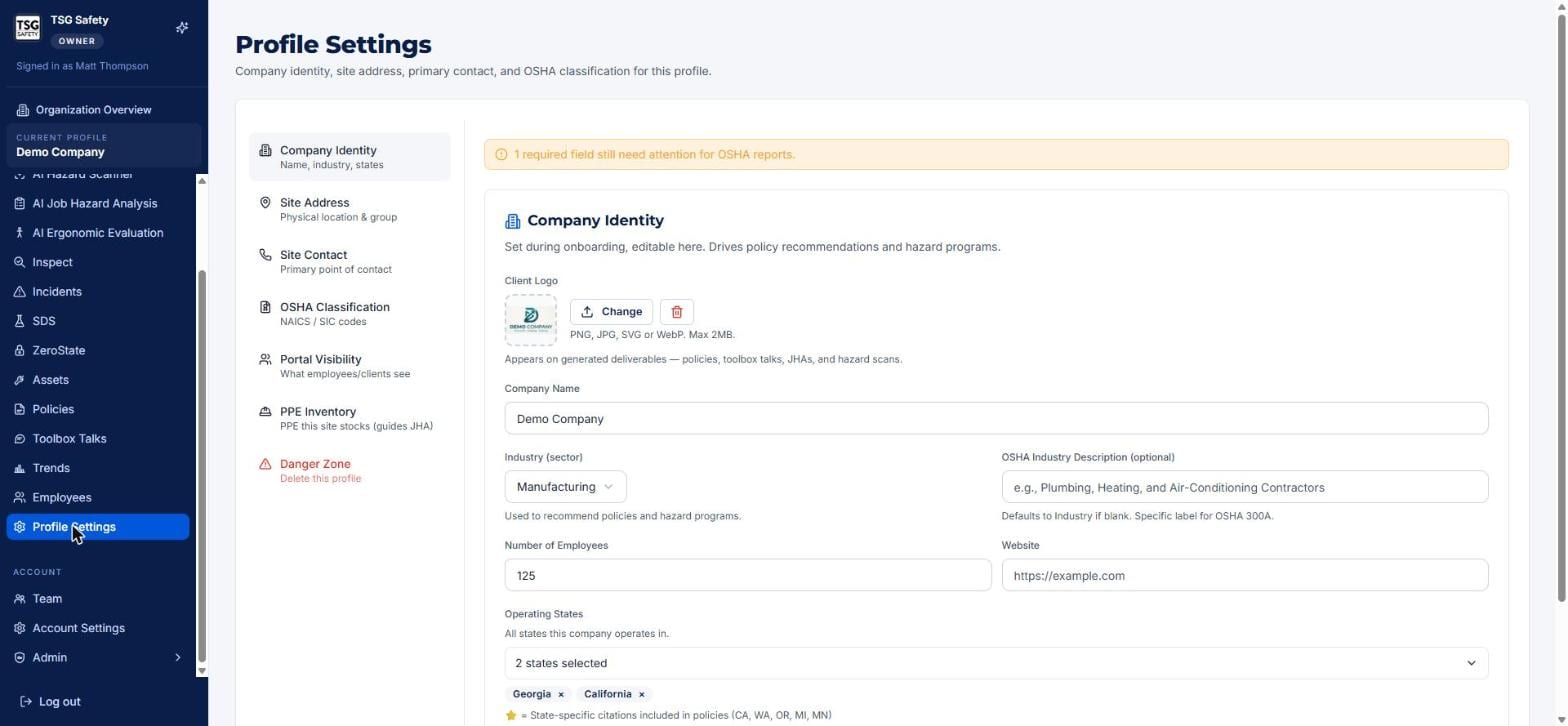
2Company Identity
The first section holds the essentials set during onboarding and editable here at any time.
| Field | What it drives |
|---|---|
| Client logo | Appears on generated deliverables - policies, toolbox talks, JHAs and hazard scans. |
| Company name | Prints on every report and document for this site. |
| Industry (sector) | Drives which policies and hazard programs ShieldSphere recommends. |
| OSHA industry description | The specific label used on the OSHA 300A; defaults to the industry if blank. |
| Number of employees | Used across reporting and recordkeeping. |
| Operating states | Every state the company operates in - state-specific citations are included in policies for states that have them. |
A banner at the top flags any field still needed for OSHA reports. Clear it - a missing required field can leave a hole in an exported 300A or 301.
3Address, contact and classification
Three sections capture where the site is, who speaks for it, and how it is classified.
| Section | What you set |
|---|---|
| Site Address | The physical location of the site and the group it belongs to. |
| Site Contact | The primary point of contact for the site - printed on reports and used where a person is needed. |
| OSHA Classification | The site's NAICS and SIC codes, which the 300A and other reports rely on. |
4Portal Visibility and PPE Inventory
Two sections shape what others see and what the AI knows about your site.
Portal Visibility
Controls what employees and clients see of this site - use it to decide how much of the portal is exposed to non-admins.
PPE Inventory
The PPE this site stocks. It guides the JHA - the Job Hazard Analysis draws on what you actually have when it recommends protective equipment.
Keeping the PPE inventory current means a generated JHA recommends gear you actually stock, not a generic list - a small setup task with an outsized effect on how usable your analyses are.
5Danger Zone
The final section, Danger Zone, is where a profile is deleted.
Removing a site takes its inspections, incidents, policies, assets and every other record with it. Export anything you need first, and be certain - there is no undo.
6Troubleshooting
| Symptom | Cause and fix |
|---|---|
| The wrong policies are recommended | The industry is set incorrectly. Fix it under Company Identity - it drives the recommendations. |
| State citations are missing from policies | The state is not in Operating States. Add every state the company works in. |
| An OSHA report has a blank required field | Clear the required-field banner at the top of the page - something under Company Identity or Classification is unset. |
| Our logo is not on exported documents | Upload it under Company Identity - it appears on generated deliverables. |
| A JHA recommends PPE we do not stock | Update the PPE Inventory section so the JHA draws on what you actually have. |
Try Profile Settings in ShieldSphere
Start a free hazard scan and see the platform these guides describe - no credit card required.
Screens captured from the live application in July 2026 using a demonstration site - your screens will show your own data. Because ShieldSphere ships changes regularly, check the version above against the current release before circulating this guide widely. Questions? Contact support.