
Projects
the job everything else hangs off
How to set up a project, assign the contractors working on it, and decide what happens when someone whose paperwork is not in order tries to sign in at the gate.
Short answer
ShieldSphere's Projects module is the job that other records attach to. A project has a site, dates, phases and the contractors assigned to it, and permits and site sign-ins can be tied to it. Its hard gate setting decides whether a worker whose contractor's paperwork has lapsed is warned at sign-in or refused entry outright.
1What Projects does
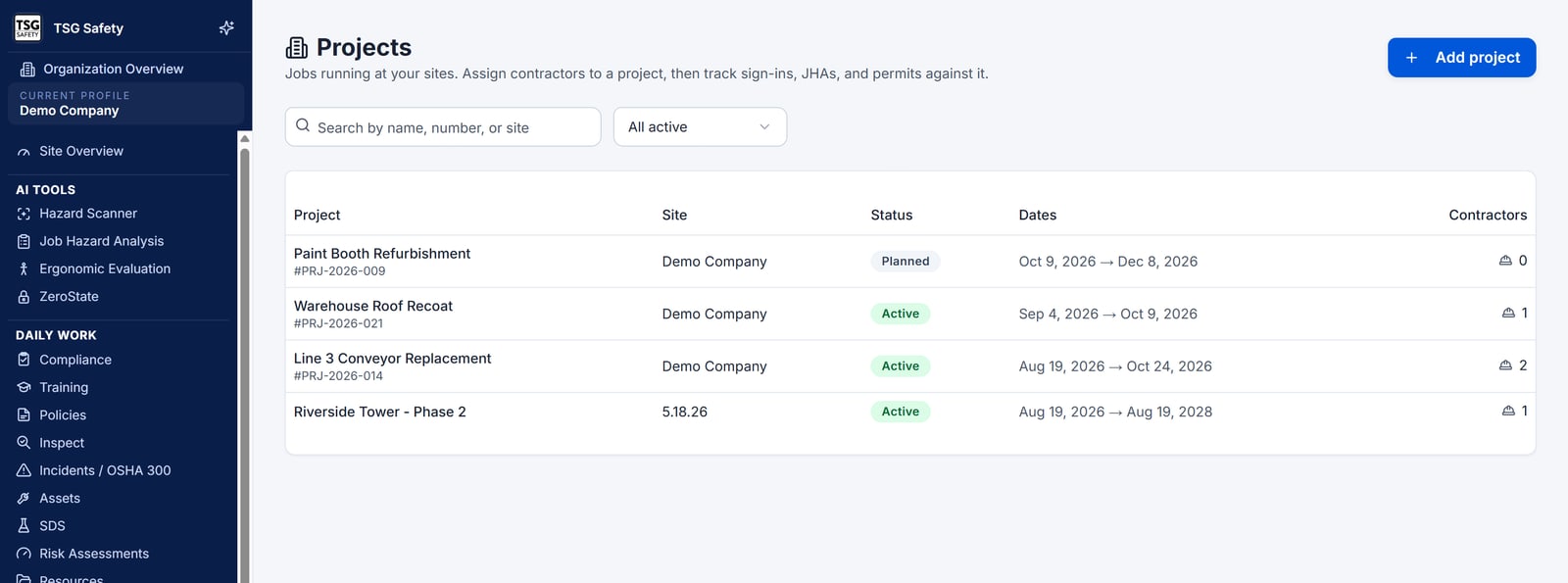
A project is the unit most site work is actually organised around - and once it exists, other records can say which job they belong to.
On its own a project is a small thing: a name, a site, some dates, a status. What makes it worth setting up is what attaches to it. Permits can be raised against a project. Site sign-ins can be recorded against it. Contractors are assigned to it with a trade and a date range. And the project carries the one setting that decides what happens at the gate when someone's paperwork is not in order.
2Words you'll see
| Word | What it means |
|---|---|
| Project | One job at one site, with a start and an end. |
| Phase | A stage within the project, for jobs long enough that "the project" is too coarse. |
| Assignment | A contractor put on this project, with their trade and the dates they are on site. |
| Trade on this job | What that contractor is here to do - which may differ from what they usually do. |
| Site access gate | The setting that decides whether a blocking compliance problem refuses a sign-in or merely flags it. Soft or hard. |
| Override code | A code that lets a refused worker through anyway, with the override recorded. |
3Create a project
Name it and choose the site
A project runs at one site. Choosing it is what puts the project in front of the right people, because everything in ShieldSphere is scoped by location.
Set the dates
Start and end dates. The end date must be on or after the start - the form will not let you save otherwise.
Add phases if the job needs them
Phases are optional. Use them when different parts of the job carry genuinely different risks, so a permit or a sign-in can point at the phase rather than the whole project.
4Assign contractors
Open the project and use Assign contractor. Each assignment records the contractor, their trade on this job, the dates they are on site from and until, and any scope notes.
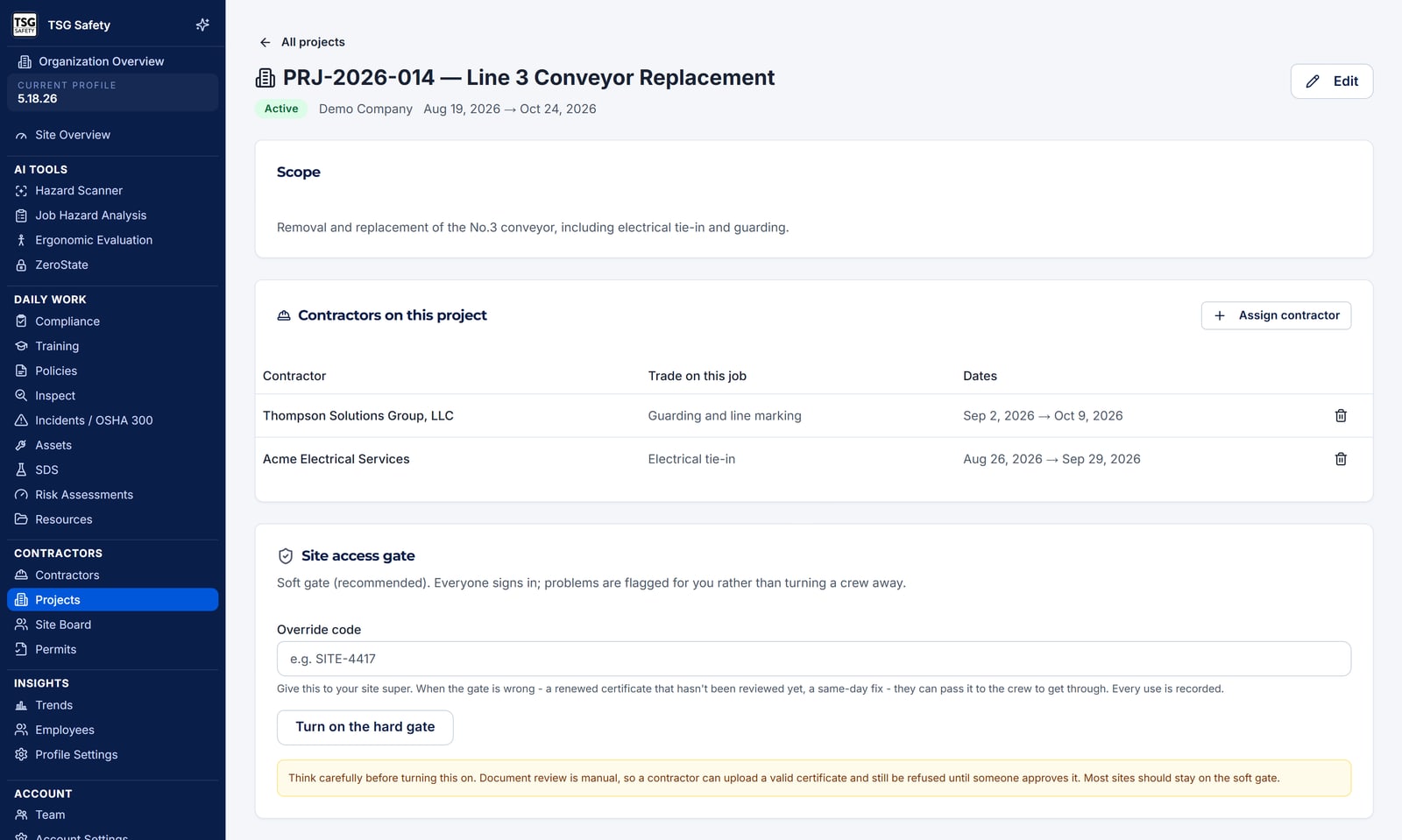
Site sign-in checks the signing worker's contractor against their compliance status. A contractor who has not been assigned to the project is not being checked against anything - so assignment is not administrative tidiness, it is the thing that makes the gate meaningful.
Contractors have to exist in Contractor Management before they can be assigned. That is where their insurance, documents and approval status live - see the Contractor Management User Guide.
5The site access gate
This is the most consequential setting in the module, and it deserves a deliberate decision rather than a default.
When a worker signs in to a site, ShieldSphere checks their contractor's compliance and raises flags. Flags come in two severities:
| Severity | What raises it |
|---|---|
| Blocking | The contractor is suspended or archived, or their certificate of insurance has expired. |
| Warning | The contractor is pending approval, inactive or expired; a document is expiring soon or has expired; a worker's training has lapsed. |
The site access gate decides what a blocking flag does:
Soft gate (recommended)
Everyone signs in and problems are flagged for you rather than turning a crew away. The default, and the right choice for most sites.
Hard gate
A blocking flag refuses the sign-in, with the reason given, so the person at the gate can act on it.
With the hard gate on you can also set an override code. Give it to your site supervisor: when the gate is wrong - a renewed certificate nobody has reviewed yet, a same-day fix - they can pass it to the crew to get through, and every use is recorded. A project with no code configured cannot be overridden at all.
A contractor can upload a perfectly valid certificate and still be refused, because it stays unapproved until a person reviews it. So a hard gate does not only stop genuinely non-compliant crews; it stops compliant ones whose paperwork is sitting in your own review queue, sometimes at 6am before anyone who can clear it is awake.
Turn it on where the risk justifies it, decide in advance who holds the override code, and watch how often it is used - a gate being overridden daily is telling you it is miscalibrated, not that people are being careless.
If the gate setting cannot be read for any reason, the sign-in is admitted rather than refused, and the compliance flag is still recorded. A database problem must never present itself as a locked gate.
6Troubleshooting
| What you see | What to do |
|---|---|
| "Projects are not set up yet" | No projects exist at this site. Add one - other modules can reference it as soon as it does. |
| A contractor is not in the assign list | They have to exist in Contractor Management first. |
| The project will not save | The end date is before the start date, or the project has no name or site. |
| Someone with expired paperwork got on site | Either that project is on the soft gate, or the flag was a warning rather than blocking. Check which - a lapsed training is a warning, an expired COI is blocking. |
| A worker is being refused and should not be | Fix the underlying flag in Contractor Management. Use the override code only for the case in front of you, not as the routine answer. |
| Nobody is being gated at all | Check the contractor is actually assigned to the project. Sign-ins that reference no project are never gated. |
Try Projects in ShieldSphere
Start a free hazard scan and see the platform these guides describe - no credit card required.
Screens captured from the live application in September 2026 using a demonstration site - your screens will show your own data. Because ShieldSphere ships changes regularly, check the version above against the current release before circulating this guide widely. Questions? Contact support.