
Site Board
who is on site today, and what they owe
How to read the daily board: who has signed in, which contractors have filed their JHA and held their toolbox talk, what training happened here today, and which sign-ins came with a compliance problem attached.
Short answer
ShieldSphere's Site Board is the one screen that answers "who is on my site right now, and is everything they owe in order". It rolls up each contractor's day - did they sign in, file a JHA, hold a toolbox talk - lists every individual sign-in with any compliance flags attached, and shows the training delivered at that location today.
1What the Site Board does
Everything on this board exists somewhere else in ShieldSphere. The board's job is to put today's slice of all of it on one screen, in the order a site manager actually needs it.
It answers three questions, in this order:
- Per contractor - did they sign in, file a JHA and hold a toolbox talk today?
- Per person - who signed in, when, on which project, and did anything flag?
- Per location - what training was actually delivered here today?
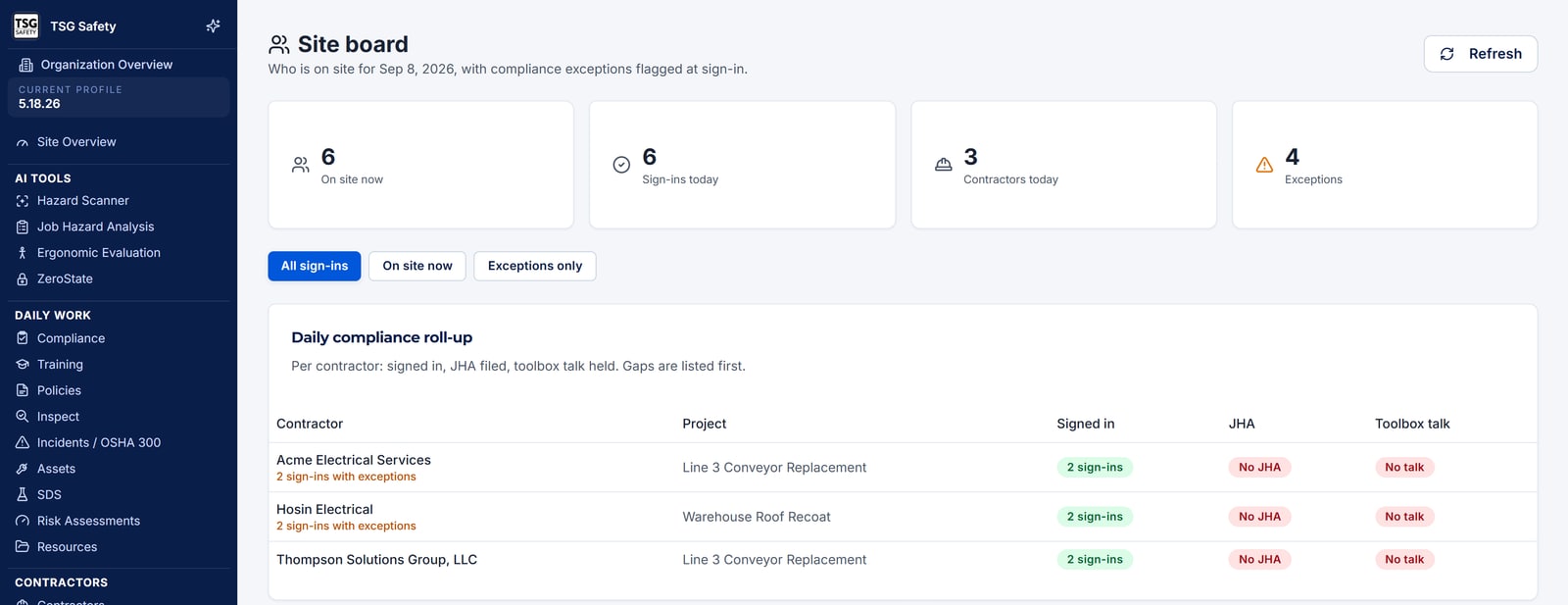
Every cell shows a written status next to its colour. Around one in twelve men has a colour vision deficiency, and a board that only says "green" is unreadable to them - which on a safety board is not a cosmetic problem.
2Words you'll see
| Word | What it means |
|---|---|
| Roll-up | One row per contractor per project per day, summarising what they owe. |
| Signed in | Somebody from that contractor recorded a site sign-in today. |
| JHA | A Job Hazard Analysis filed for the work being done. |
| Toolbox talk | A talk held for that crew today. |
| Exception | A sign-in that carried a compliance flag - expired insurance, lapsed training, a contractor not in good standing. |
| On site now | Signed in and not yet signed out. |
| Not expected | Nothing is owed. A contractor with nobody on site owes no JHA and no talk. |
| Headcount | How many people from that contractor signed in. |
3The daily compliance roll-up
The roll-up is one row per contractor, per project, per day, with three cells: signed in, JHA and toolbox talk. Each cell reads as complete, partial, missing, or not expected.
A contractor with nobody on site today owes no JHA and no toolbox talk, so those cells read not expected rather than missing. Counting them as gaps would manufacture a problem that does not exist and train people to ignore the board.
Each row also carries a headcount and an exception count, and the row's overall status is the worst of its three cells - so a contractor who signed in but held no talk sorts alongside the genuinely incomplete ones rather than hiding behind two greens.
4The sign-in list
Below the roll-up, every individual sign-in for the day: the worker, their contractor, the project, the time, and the current status - signed in, or closed.
Two filters sit above it:
All sign-ins
Everything recorded today. The list to scan when you want the full picture.
Exceptions only
Just the sign-ins that flagged something. This is the working list - usually a handful of rows out of a hundred.
A sign-in flags when the worker's contractor is suspended, archived, inactive, pending approval or expired; when one of their documents has expired or is close to it; or when a worker's training has lapsed. Whether a flag refused the sign-in or merely recorded it is decided by the project's hard gate - see the Projects User Guide.
If the hard gate is off, a blocking problem is recorded and the person still walks on site. That is a legitimate setup - many organizations prefer to know rather than to refuse - but it means the exceptions list is a list of things to act on today, not a log of things that were already prevented.
5Training held here today
The board also shows the training sessions delivered at this location today - toolbox talks and training classes alike, with what was covered and who presented it.
This is a different question from the roll-up's toolbox talk cell. The roll-up asks whether a contractor's crew had a talk. This asks what actually happened at this location, including sessions your own people ran. It is shown even when nobody signed in, because a crew can hold a talk on a day with no contractor activity at all.
Sessions appear here as they are run. If you use the QR sign-in for toolbox talks, the board fills in over the morning without anyone typing anything - see the Training Sessions User Guide.
6Working the board
A sensible routine, in the order the board is laid out:
Mid-morning: switch to Exceptions only
By then most of the day's sign-ins are in. The exceptions list is short and every row is something you can still fix today.
Scan the roll-up for missing talks and JHAs
A contractor on site with no toolbox talk recorded is the most common gap, and the easiest to close while they are still here.
Before you leave: check who is still on site
On site now counts people signed in and not signed out. A number that never drops to zero usually means people are not signing out rather than that they are still working.
7Troubleshooting
| What you see | What to do |
|---|---|
| "Site sign-in is not set up yet" | Nothing has recorded a sign-in at this location. Sign-in comes through the contractor portal - see the Contractor Management guide. |
| The board is empty on a busy day | Check the location selected in the sidebar, and the date. The board is per site, per day. |
| A contractor shows "not expected" but they are here | Nobody from that contractor has signed in, so nothing is owed yet. If they are on site without signing in, that is the problem to fix. |
| Exception counts look too high | Most flags are warnings, not blocks - an expiring document counts. Work the blocking ones first: suspended or archived contractors and expired insurance. |
| "On site now" never reaches zero | People are signing in and not signing out. The count is honest about what was recorded, not about who went home. |
| A toolbox talk was held but the cell says missing | The talk has to be recorded against a session for the board to see it. Running it as a session is what makes it count. |
Try Site Board in ShieldSphere
Start a free hazard scan and see the platform these guides describe - no credit card required.
Screens captured from the live application in September 2026 using a demonstration site - your screens will show your own data. Because ShieldSphere ships changes regularly, check the version above against the current release before circulating this guide widely. Questions? Contact support.