
Policies
administrator setup & configuration
How to generate written safety programs, grade an existing manual against OSHA, and manage saved policies, versions and formatting.
Short answer
Administrators generate written safety programs in ShieldSphere by answering a short site-specific intake; the platform writes the program cited to the federal and state standards it must answer to, then grades it with an AI compliance review. You can also upload an existing manual to be graded against OSHA, and manage saved policies and their versions.
This Administrator Guide covers creating and managing written safety programs. For browsing and reading policies, see the companion ShieldSphere Policies User Guide.
1Generate a policy
Answer a short intake and ShieldSphere writes the program for your operation, cited to the standards it must answer to.
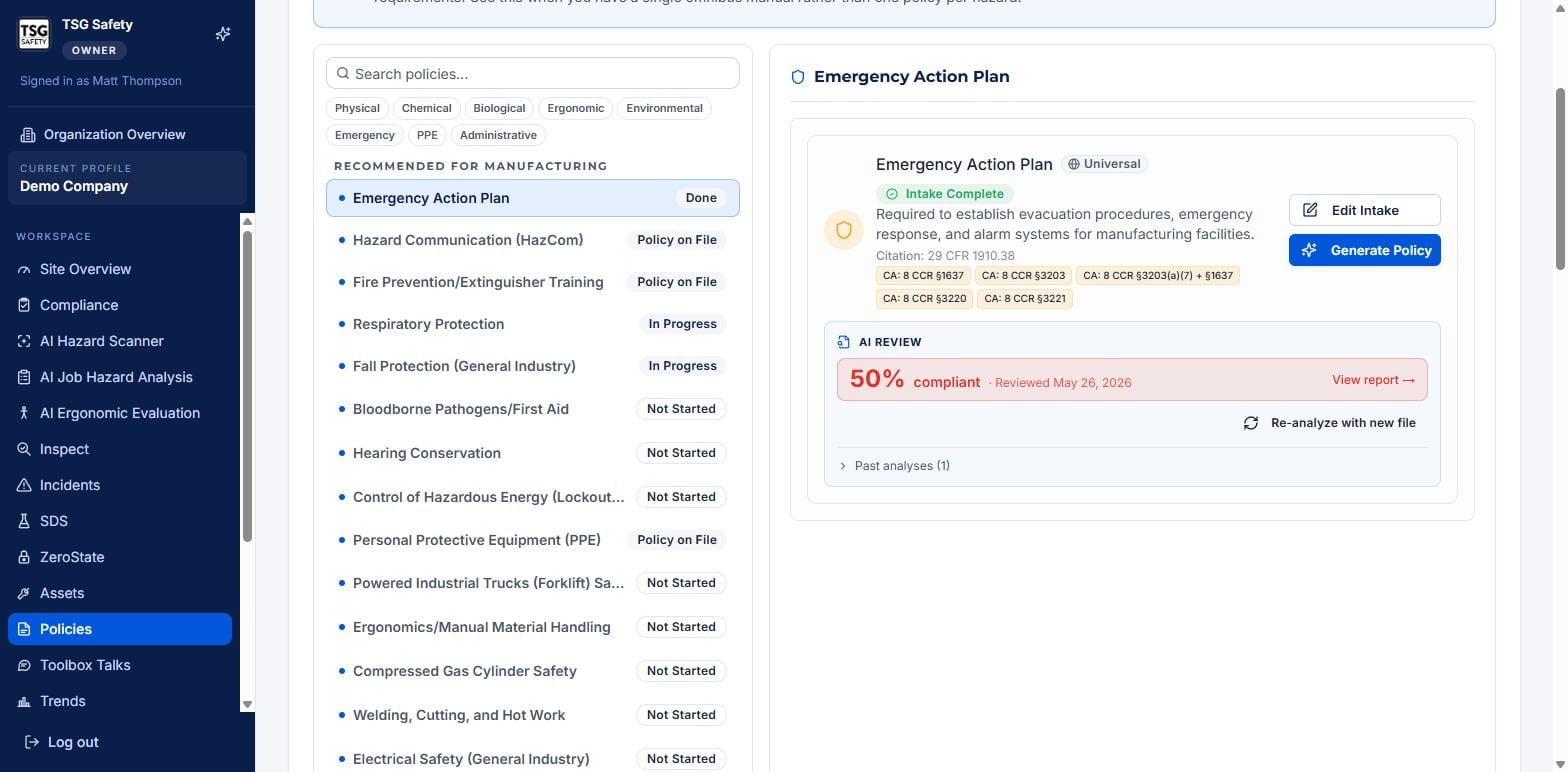
Complete the intake
Select a program and answer its intake - the site-specific questions that make the policy yours rather than a template. Edit Intake reopens those answers later.
Generate and review
Click Generate Policy. ShieldSphere writes the program against the federal and state citations shown, then runs an AI review that grades it for compliance. Open View report to see where it is strong and where it needs work.
Treat the first grade as a draft score. Improve the policy, re-analyze, and watch the percentage climb - Past analyses keeps the history so you can show the improvement.
2Grade an existing manual
Already have a safety manual? Use the Have an existing safety manual? option at the top of the module to upload a PDF or Word document. ShieldSphere identifies every OSHA program the manual covers and grades each one against federal and state requirements.
Uploading a manual is the right move when your programs live in a single omnibus document. Generating per-program is better when you want a discrete, separately graded policy for each hazard. You can mix both.
3Manage saved policies
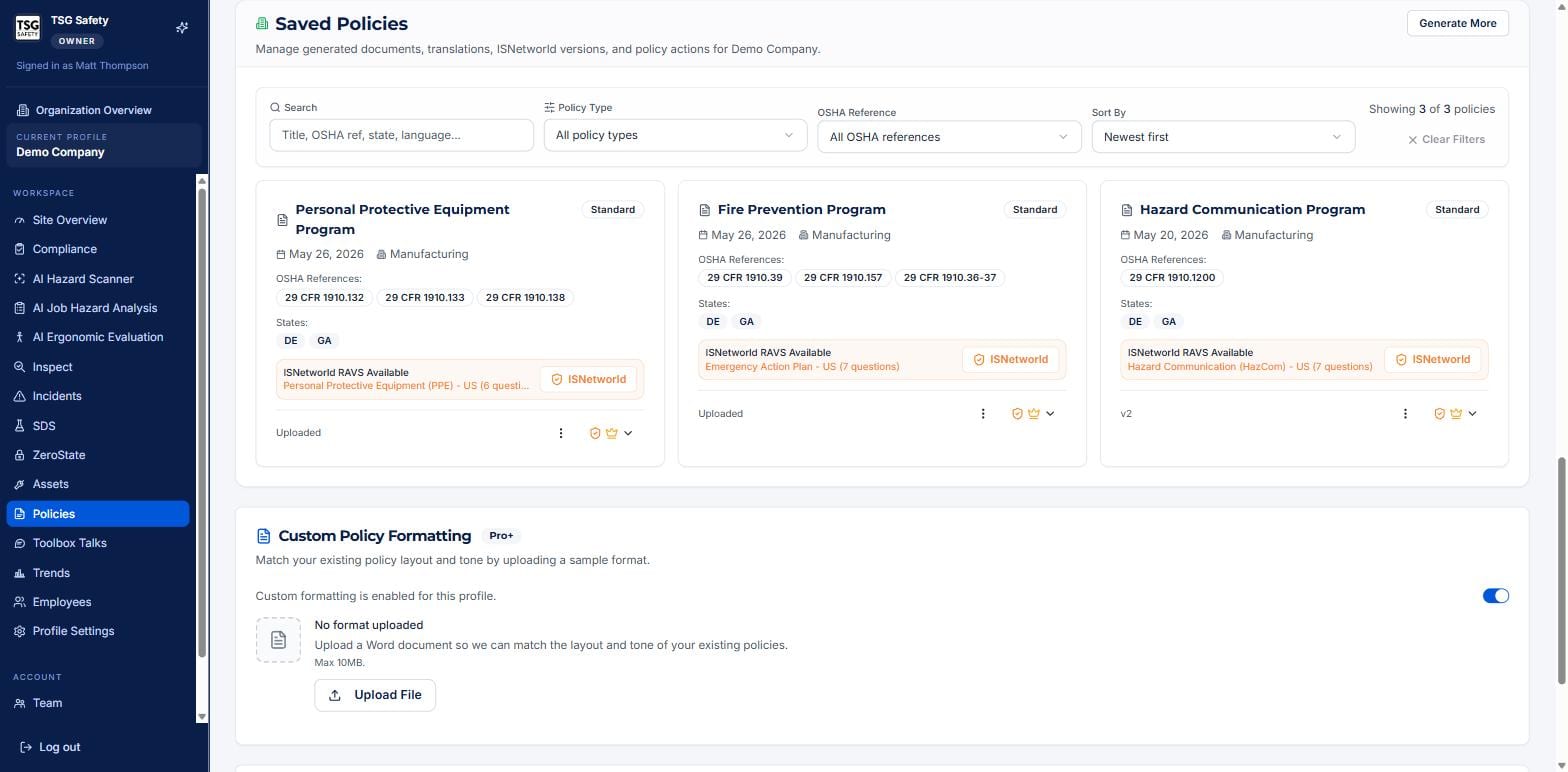
The Saved Policies section is where finished documents are managed - versions, translations, ISNetworld RAVS versions, and per-policy actions.
| Control | What it does |
|---|---|
| Generate More | Produce additional documents, translations or ISNetworld versions. |
| ISNetworld | Produce or open the ISNetworld RAVS version a client's prequalification requires. |
| Custom Policy Formatting | Upload a sample Word document so generated policies match your existing layout and tone (a Pro+ feature). |
| Per-policy menu | Version, translate, download or otherwise act on an individual saved policy. |
4Troubleshooting
| Symptom | Cause and fix |
|---|---|
| Generate Policy is unavailable | The intake is incomplete. Finish the intake questions first. |
| The grade did not change after an edit | Re-run it with Re-analyze with new file - the score reflects the last analyzed version. |
| Generated policies do not match our house style | Turn on Custom Policy Formatting and upload a sample document. |
| A client needs an ISNetworld RAVS version | Use the ISNetworld action on the saved policy to produce it. |
| The uploaded manual missed a program | Generate that program separately - manual grading covers what the document contains. |
Try Policies in ShieldSphere
Start a free hazard scan and see the platform these guides describe - no credit card required.
Screens captured from the live application in July 2026 using a demonstration site - your screens will show your own data. Because ShieldSphere ships changes regularly, check the version above against the current release before circulating this guide widely. Questions? Contact support.