
SDS Management
administrator setup & configuration
How to turn the SDS module on for a site and set up the public-access QR poster that gives on-shift workers their Safety Data Sheets.
Short answer
An administrator turns on ShieldSphere's SDS module for a site in Module settings, then sets up the public-access QR poster. A worker scans that code with a phone camera and sees the site's Safety Data Sheets without logging in - the accessible-on-every-shift access OSHA's Hazard Communication Standard requires. Managing the inventory itself is covered in the SDS User Guide.
This Administrator Guide covers enabling the SDS module and setting up on-shift access. For managing the chemical inventory and Safety Data Sheets day to day, see the companion ShieldSphere SDS User Guide.
1Turn the module on
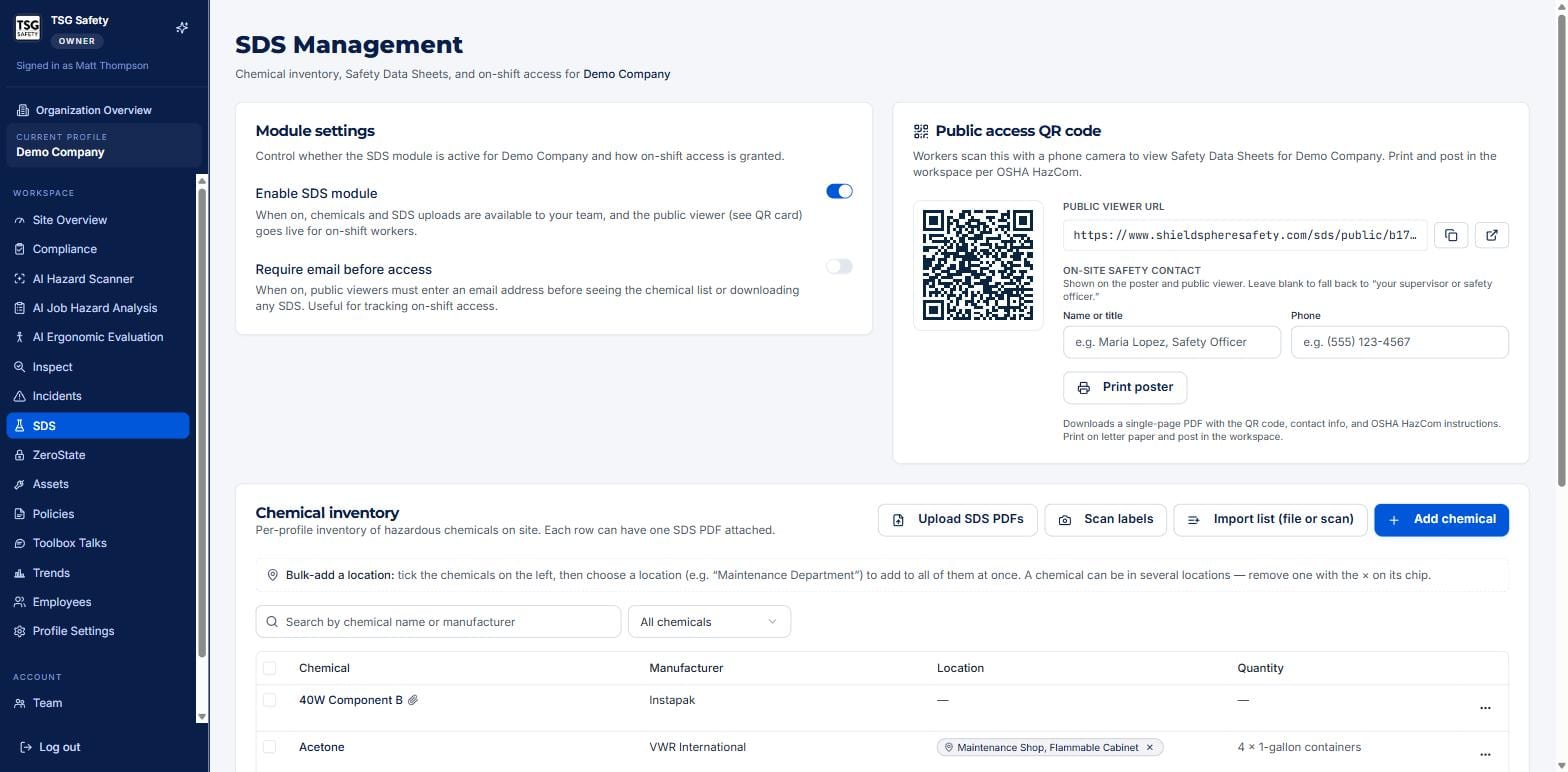
Two switches decide whether the SDS module is live for a site and how on-shift access works.
| Setting | What it does |
|---|---|
| Enable SDS module | When on, chemicals and SDS uploads are available to your team and the public viewer goes live for on-shift workers. Off, and the module is hidden for the site. |
| Require email before access | When on, public viewers must enter an email address before seeing the chemical list or downloading an SDS - useful for tracking who accessed what on shift. |
2The public-access QR poster
OSHA's Hazard Communication Standard requires SDSs to be accessible to workers on every shift. The public access QR code is how ShieldSphere meets that: a worker scans it with a phone camera and sees the site's Safety Data Sheets, no login required.
Set the on-site safety contact
Fill in the name or title and phone of the on-site safety contact. These print on the poster and show in the public viewer, so a worker who needs a person, not a PDF, knows who to call. Leave them blank to fall back to "your supervisor or safety officer".
Print and post it
Click Print poster to download a single-page PDF with the QR code, the contact info, and OSHA HazCom instructions. Print it on letter paper and post it in the workspace - by the chemical storage area is the obvious place.
An SDS binder no one can find during an incident is a HazCom finding. A posted QR that any worker can scan from their phone is the accessible-on-every-shift access the standard asks for - put it where the chemicals are.
3Troubleshooting
| Symptom | Cause and fix |
|---|---|
| The team cannot see the SDS module | It is disabled for the site. Turn on Enable SDS module in Module settings. |
| The public viewer shows nothing | The module is off, or no chemicals are in the inventory yet. Enable it and confirm the inventory is populated. |
| I want to know who viewed the SDSs | Turn on Require email before access so public viewers identify themselves first. |
| The poster has the wrong contact | Update the on-site safety contact name and phone, then re-print the poster. |
Try SDS Management in ShieldSphere
Start a free hazard scan and see the platform these guides describe - no credit card required.
Screens captured from the live application in July 2026 using a demonstration site - your screens will show your own data. Because ShieldSphere ships changes regularly, check the version above against the current release before circulating this guide widely. Questions? Contact support.